
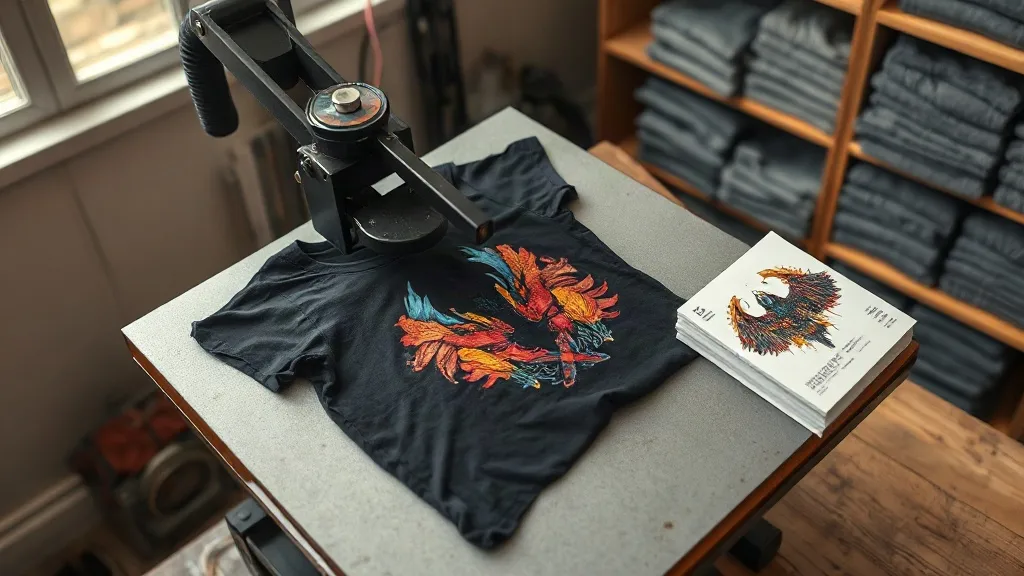
Most people who try dtf transfers for the first time run into the same wall. The print looks fantastic straight off the press, then a few washes later the edges start to lift, or the color goes dull on dark fabric, or a fine detail in the artwork turns into a blurry smudge. The film did not fail. The process did, usually in one of three places: the file, the press settings, or the storage between printing and pressing. Once you understand what the film is actually doing, those failures become predictable and easy to fix.
This guide walks through the whole chain the way a small shop experiences it, with the details that matter when you are pressing dozens of shirts a week rather than one test piece.
What DTF Film Is Doing Under the Heat
A dtf transfer is a printed film with a thermoplastic adhesive powder fused to the back of the ink layer. Under heat and pressure, that powder melts, grabs the fabric fibers, and locks the ink in place. The ink itself never soaks into the garment. It sits on top, which is exactly why DTF works on cotton, polyester, blends, canvas, and even some nylon without the color shifting you get with sublimation.
That also explains the most common complaint. Because the ink sits on the surface, adhesion quality is entirely dependent on how well the powder melted and how clean the fabric was when it happened. A shirt with fabric softener residue, a polyester weave with a slick finish, or a press that is ten degrees too cool will all produce a transfer that looks fine cold and peels after three washes.
File Setup That Saves You Rework
Good output starts before anything touches the printer. DTF is forgiving compared to vinyl, but it has its own rules, and ignoring them costs you blanks.
Resolution and line weight
Send artwork at 300 DPI at final print size. Anything thinner than about 0.5 mm in a line or a gap between shapes is at risk of filling in or breaking up, especially on textured fabrics. If a design depends on hairlines, thicken them slightly rather than hoping the printer holds them.
White underbase and trapping
Every DTF print on a dark garment needs a white layer behind the color. Where the color meets the edge of the design, the white should sit just inside the color boundary, not outside it. If the white extends past the color, you get a pale halo around the artwork that is very visible on black shirts. Most RIP software handles this automatically, but check it on a proof before you commit to a run.
Transparency and shadows
Soft drop shadows and semi-transparent gradients are where DTF struggles most. A 20 percent opacity shadow over a white underbase can turn into a visible grey rectangle. Either push the transparency higher or convert the shadow to a solid tone before printing.
- Flatten all layers and embed fonts before export
- Keep the design at least 1 cm from the film edge
- Mirror the file only if your workflow requires it, and verify on a small test
Press Settings That Actually Hold Up
Numbers vary by film brand, powder type, and press, so treat any figure here as a starting point and dial it in with your own equipment. That said, the relationships between the variables are consistent.
Temperature and pressure
Most DTF powders fuse in the 150 to 165 Celsius range. Pressure matters as much as heat. Too little pressure and the powder never fully contacts the fabric, which shows up as patchy adhesion at the edges. Too much pressure on a thin polyester can leave a shine mark around the design that never comes out. Medium pressure with a firm, even press is the target.
The peel matters more than people think
Cold peel is the safer default for DTF. Pulling the film while it is still hot stretches the still-soft adhesive and can drag fine details. Let the garment cool for at least thirty seconds, then peel in one smooth motion at a shallow angle.
The second press
After peeling, a short second press through a cover sheet or parchment sets the ink into the fabric and smooths the surface. Skipping this step is one of the most common reasons a transfer feels slightly tacky or looks textured. Ten to fifteen seconds is usually enough.
Choosing a Supplier Without Getting Burned
When you search for dtf transfers near me, you are usually looking for two different things: speed and consistency. A local supplier who can turn a rush order around in a day is worth a lot when a client needs forty shirts by Friday. A supplier who ships nationwide but holds tight quality control is worth a lot when you need the same red on every reorder six months later.
Whichever route you take, ask three questions before you commit to a volume order. What film and powder do they use, since that determines how the transfer behaves on stretch fabrics. Can they send a sample run with your actual artwork on your actual garment. And what is their color consistency policy if a reprint does not match the first batch. A supplier who cannot answer those clearly is a supplier who will cost you money eventually.
If you are ordering ready-made designs rather than printing your own, check how the gang sheet is laid out. Tight nesting saves film cost, but designs packed too close to the edge are the ones that fail first in shipping.
Storage and Handling Between Print and Press
Printed film is not shelf-stable forever. Powder absorbs moisture from the air, and humid film presses badly no matter what your settings are. Keep finished sheets flat, in a sealed bag or bin, away from direct sun and heat. If your shop runs humid in summer, a silica pack in the storage bin is cheap insurance.
Do not stack heavy items on printed film. The powder layer is delicate and a crease in the adhesive shows up as a permanent line on the finished shirt.
Fabric Types and What to Expect
Cotton takes DTF beautifully and holds up to repeated washing. Polyester is trickier because the fabric can dye-migrate into the white layer over time, especially with bright reds and blues underneath. If you print on cheap poly, use a low-bleed film or accept that the design may shift after a dozen washes.
Stretch fabrics need a gentle stretch test before you deliver. Press a sample, let it cool fully, then pull it in four directions. If the ink cracks at the edges, your powder did not fuse deep enough into the weave and the press settings need another look.
Frequently Asked Questions
How many washes should a DTF transfer survive?
A properly pressed transfer on cotton typically holds up for thirty or more washes when washed inside out in cold water and tumble dried low or hung to dry. High heat in the dryer is the single biggest killer of DTF prints.
Can I use DTF transfers on 100 percent polyester athletic wear?
Yes, but choose a low-bleed film and press at the lower end of your temperature range. Polyester can scorch and shine, and bright underlying dyes may migrate into the white layer over time.
Why is the white layer showing around the edges of my design?
That is a trapping issue in the file. The white underbase is extending past the color boundary. Adjust the choke or trap setting in your RIP software so the white sits slightly inside the color edge.
Do I need a special press for DTF?
A standard heat press works fine as long as it holds consistent temperature and has even pressure across the platen. A press with a cold spot will produce transfers that fail in exactly that spot.
Is DTF cheaper than screen printing for small runs?
For runs under roughly fifty pieces, DTF usually wins because there are no setup costs or screen fees. Above that volume, screen printing typically becomes more economical per unit.